# Invitations & Management


# Create Invitation

**<span class="TextRun SCXW226095579 BCX0" data-contrast="none" lang="EN-US" xml:lang="EN-US"><span class="NormalTextRun SCXW226095579 BCX0">Note: </span></span>**<span class="TextRun SCXW226095579 BCX0" data-contrast="none" lang="EN-US" xml:lang="EN-US"><span class="NormalTextRun SCXW226095579 BCX0">Custom invitation templates and Guest Lists are only available for Pro and Enterprise accounts. For more information on different accounts, see our guide on</span></span>**<span class="TextRun SCXW226095579 BCX0" data-contrast="none" lang="EN-US" xml:lang="EN-US"><span class="NormalTextRun SCXW226095579 BCX0"> [Account Types](https://support.odience.com/books/account-types "Account Types").</span></span>**

##### **<span class="TextRun SCXW226095579 BCX0" data-contrast="none" lang="EN-US" xml:lang="EN-US"><span class="NormalTextRun SCXW226095579 BCX0">Create Guest List</span></span><span class="EOP SCXW226095579 BCX0" data-ccp-props="{"134233117":false,"134233118":false,"201341983":0,"335551550":1,"335551620":1,"335559685":0,"335559737":0,"335559738":0,"335559739":160,"335559740":257}"> </span>**

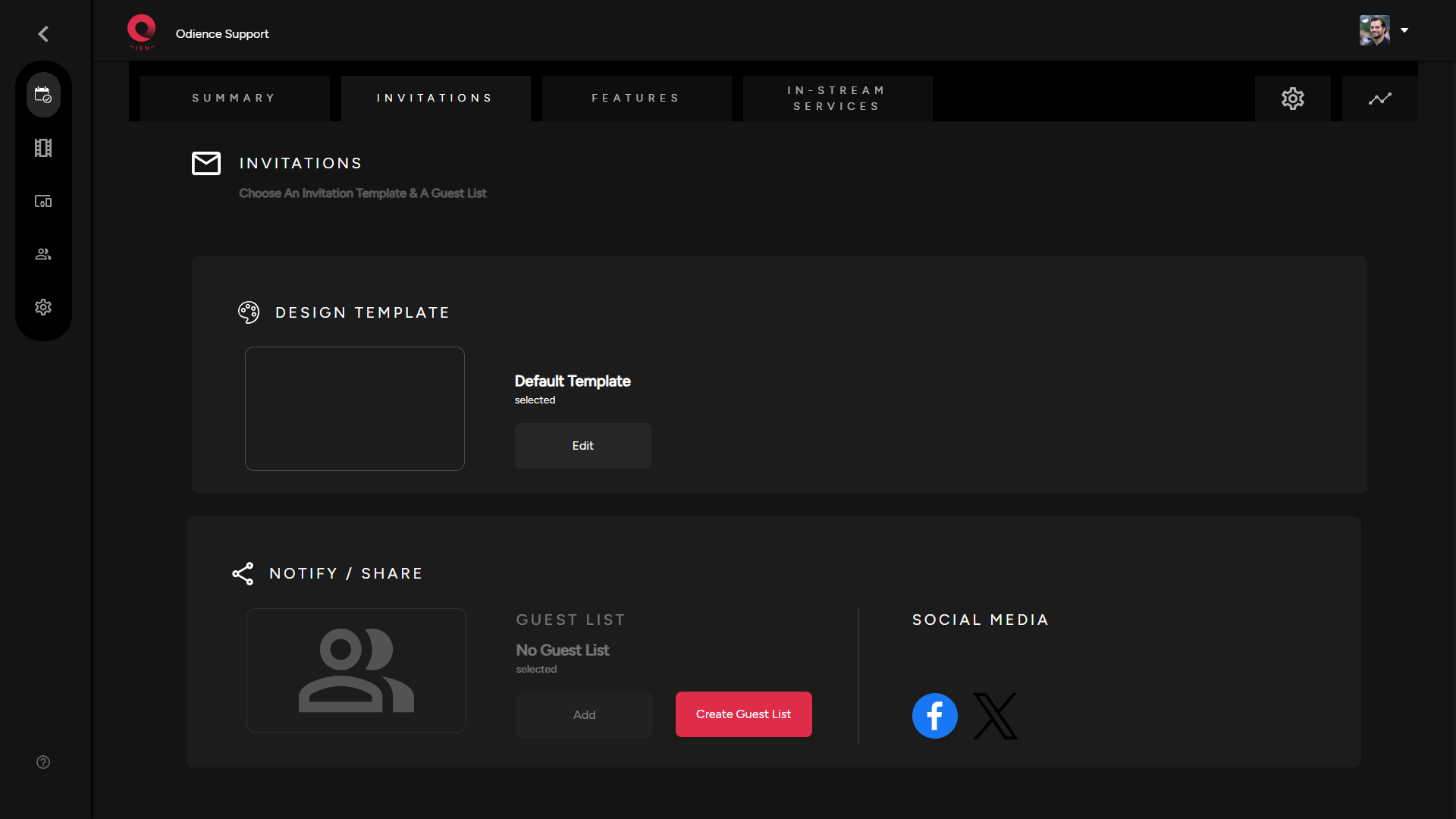
<span class="TextRun SCXW226095579 BCX0" data-contrast="none" lang="EN-US" xml:lang="EN-US"><span class="NormalTextRun SCXW226095579 BCX0">1. Select create Guest List, then click Create New within the guest list window.</span></span>

<span class="TextRun SCXW226095579 BCX0" data-contrast="none" lang="EN-US" xml:lang="EN-US"><span class="NormalTextRun SCXW226095579 BCX0">[![Invitations Section.png](https://support.odience.com/uploads/images/gallery/2024-03/scaled-1680-/invitations-section.png)](https://support.odience.com/uploads/images/gallery/2024-03/invitations-section.png)</span></span>

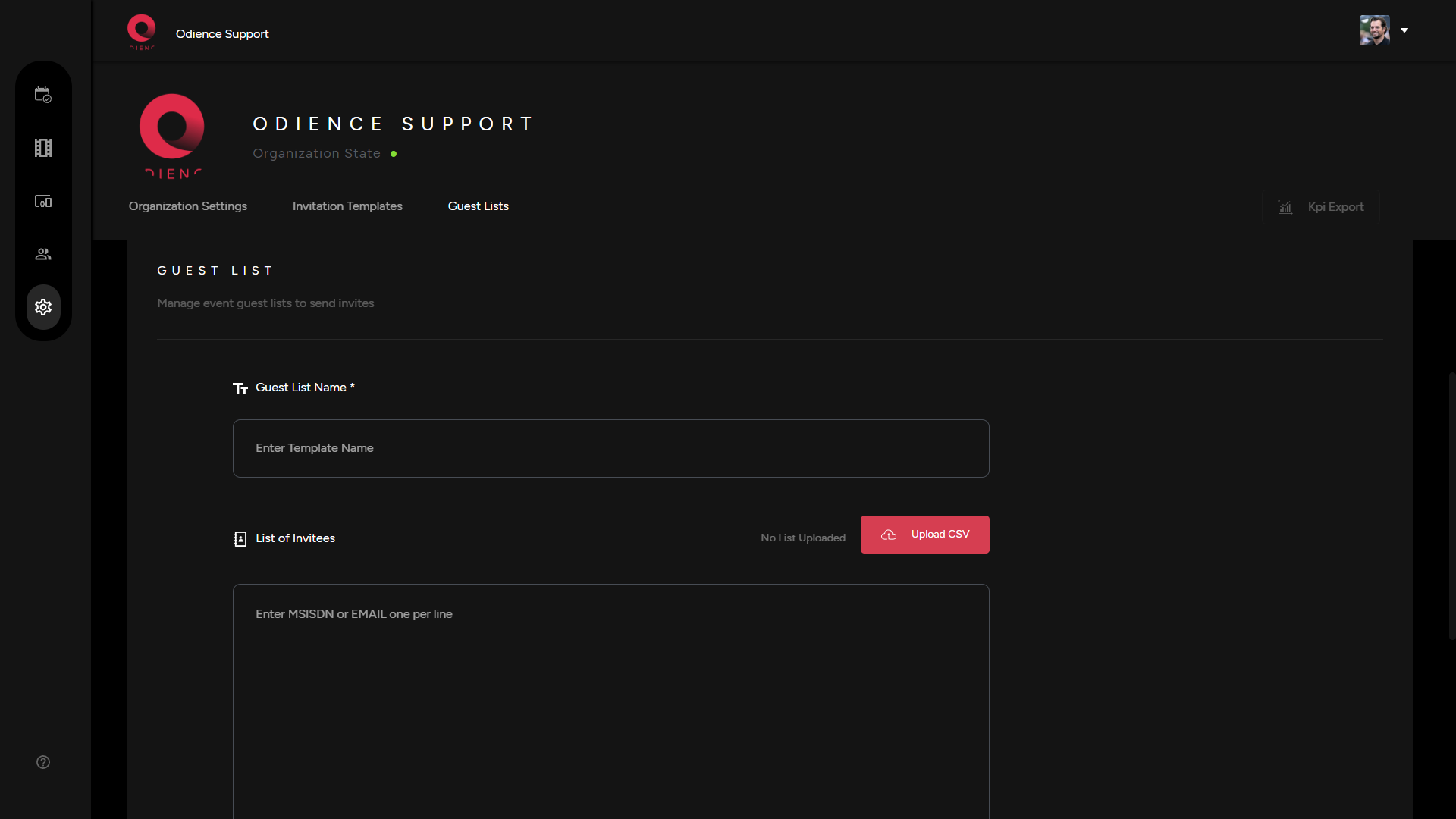
<span class="EOP SCXW226095579 BCX0" data-ccp-props="{"134233117":false,"134233118":false,"201341983":0,"335551550":1,"335551620":1,"335559737":0,"335559738":0,"335559739":160,"335559740":257}">2. Fill out the information to create your guest list. Send invitation using phone numbers or send via email. Click Add Guest List to confirm.</span>

[![Guest Lists Creation.png](https://support.odience.com/uploads/images/gallery/2024-03/scaled-1680-/guest-lists-creation.png)](https://support.odience.com/uploads/images/gallery/2024-03/guest-lists-creation.png)

<span class="TextRun SCXW226095579 BCX0" data-contrast="none" lang="EN-US" xml:lang="EN-US"><span class="NormalTextRun SCXW226095579 BCX0">3. Go back to your event to apply your new guest list.</span></span>


##### **<span class="TextRun SCXW226095579 BCX0" data-contrast="none" lang="EN-US" xml:lang="EN-US"><span class="NormalTextRun SCXW226095579 BCX0">Create New Design Template</span></span><span class="EOP SCXW226095579 BCX0" data-ccp-props="{"134233117":false,"134233118":false,"201341983":0,"335551550":1,"335551620":1,"335559685":0,"335559737":0,"335559738":0,"335559739":160,"335559740":257}"> </span>**

<span class="EOP SCXW226095579 BCX0" data-ccp-props="{"134233117":false,"134233118":false,"201341983":0,"335551550":1,"335551620":1,"335559685":0,"335559737":0,"335559738":0,"335559739":160,"335559740":257}">Your invitation design template allows you to edit the appearance and presentation of your invitations.</span>

<span class="TextRun SCXW226095579 BCX0" data-contrast="none" lang="EN-US" xml:lang="EN-US"><span class="NormalTextRun SCXW226095579 BCX0">1. To create </span><span class="NormalTextRun SCXW226095579 BCX0">a new design</span><span class="NormalTextRun SCXW226095579 BCX0"> template, click Edit to get directed to </span><span class="NormalTextRun SCXW226095579 BCX0">the invitations creation page</span><span class="NormalTextRun SCXW226095579 BCX0">.</span></span>

[![Invitations Section.png](https://support.odience.com/uploads/images/gallery/2024-03/scaled-1680-/invitations-section.png)](https://support.odience.com/uploads/images/gallery/2024-03/invitations-section.png)

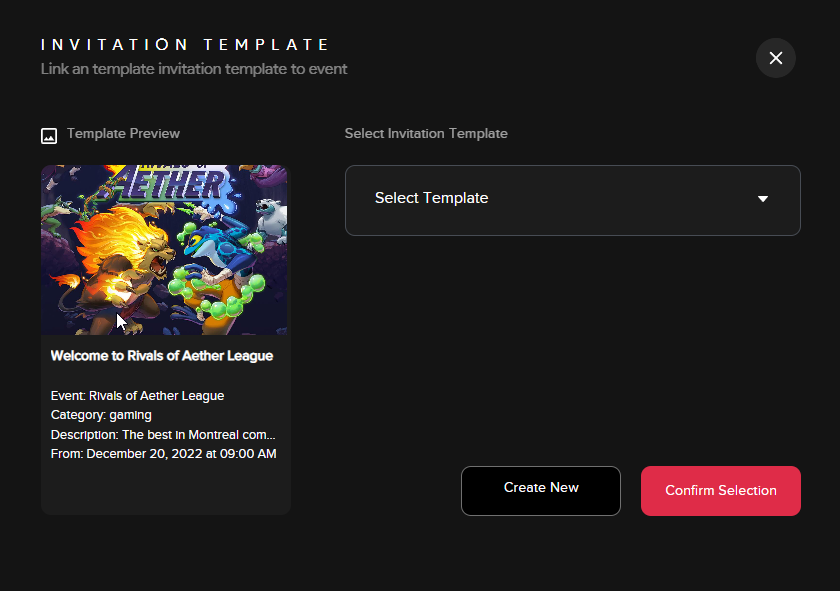
- **<span class="TextRun SCXW226095579 BCX0" data-contrast="none" lang="EN-US" xml:lang="EN-US"><span class="NormalTextRun SCXW226095579 BCX0">Note: </span></span>**<span class="TextRun SCXW226095579 BCX0" data-contrast="none" lang="EN-US" xml:lang="EN-US"><span class="NormalTextRun SCXW226095579 BCX0">If you have templates already created, a small window will open (see below) providing the option to add an existing template or to create a new one.</span></span>

<span class="EOP SCXW226095579 BCX0" data-ccp-props="{"134233117":false,"134233118":false,"201341983":0,"335551550":1,"335551620":1,"335559685":0,"335559737":0,"335559738":0,"335559739":160,"335559740":257}"><span class="SCXW226095579 BCX0"><span class="WACImageContainer NoPadding DragDrop BlobObject SCXW226095579 BCX0" role="presentation">![](http://support.odience.com/uploads/images/gallery/2023-12/embedded-image-41azra6m.png)</span></span></span>

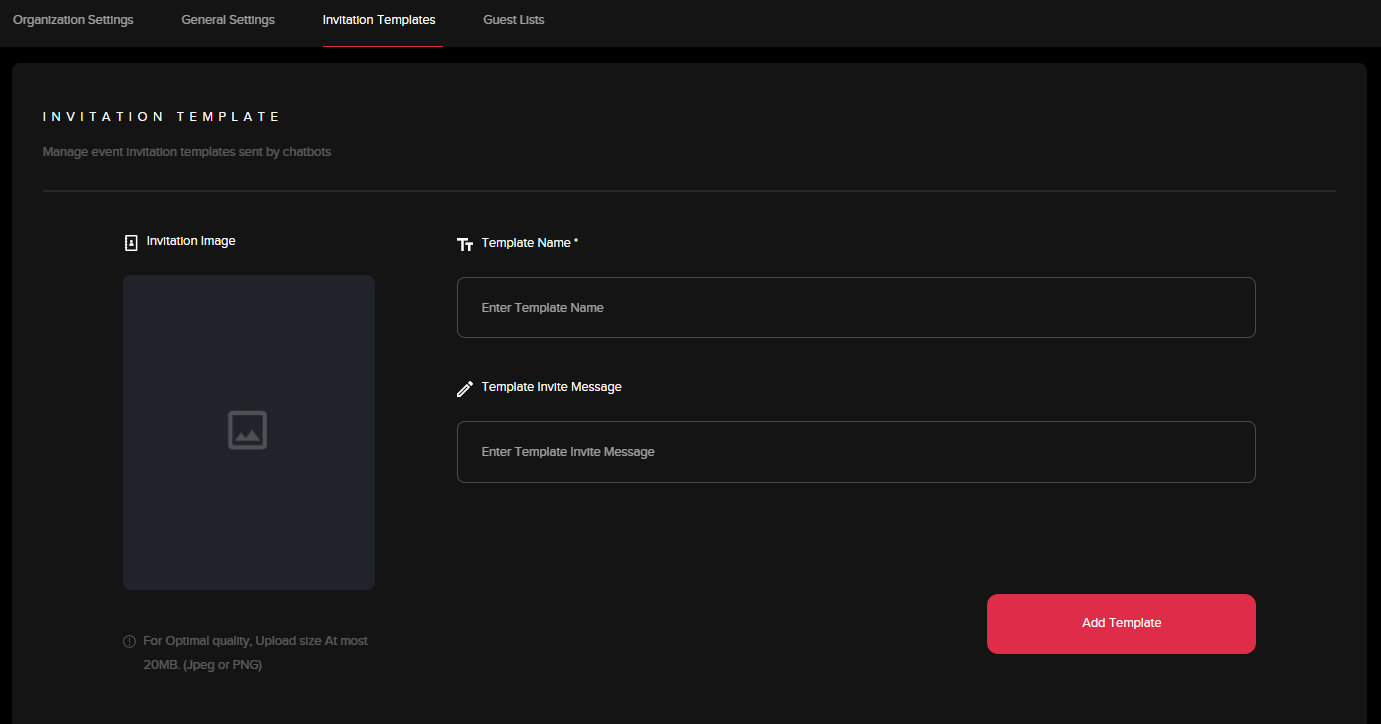
<span class="TextRun SCXW226095579 BCX0" data-contrast="none" lang="EN-US" xml:lang="EN-US"><span class="NormalTextRun SCXW226095579 BCX0">2. In the creation page, fill out the information to create your invitation template. Click "Add Template" to apply template.</span></span>

<span class="SCXW226095579 BCX0"><span class="WACImageContainer NoPadding DragDrop BlobObject SCXW226095579 BCX0" role="presentation">![](http://support.odience.com/uploads/images/gallery/2023-12/embedded-image-6snnzxjt.png)</span></span>


##### **<span class="TextRun SCXW226095579 BCX0" data-contrast="none" lang="EN-US" xml:lang="EN-US"><span class="NormalTextRun SCXW226095579 BCX0">Share via </span><span class="NormalTextRun ContextualSpellingAndGrammarErrorV2Themed SCXW226095579 BCX0">Social Media</span></span><span class="EOP SCXW226095579 BCX0" data-ccp-props="{"134233117":false,"134233118":false,"201341983":0,"335551550":1,"335551620":1,"335559685":0,"335559737":0,"335559738":0,"335559739":160,"335559740":257}"> </span>**

<span class="TextRun SCXW226095579 BCX0" data-contrast="none" lang="EN-US" xml:lang="EN-US"><span class="NormalTextRun SpellingErrorV2Themed SCXW226095579 BCX0">1. Odience can</span> be publicized <span class="NormalTextRun SCXW226095579 BCX0">to platforms like Facebook, Instagram and X</span><span class="NormalTextRun SCXW226095579 BCX0">.</span></span><span class="EOP SCXW226095579 BCX0" data-ccp-props="{"201341983":0,"335559739":160,"335559740":257}"> Simply select the social media platform &amp; go through the steps to publish. </span>

<span class="EOP SCXW226095579 BCX0" data-ccp-props="{"201341983":0,"335559739":160,"335559740":257}">Note: Social Sharing is available to all account types. <span class="TextRun SCXW226095579 BCX0" data-contrast="none" lang="EN-US" xml:lang="EN-US"><span class="NormalTextRun SCXW226095579 BCX0">For more information on different accounts, see our guide on</span></span>**<span class="TextRun SCXW226095579 BCX0" data-contrast="none" lang="EN-US" xml:lang="EN-US"><span class="NormalTextRun SCXW226095579 BCX0"> [Account Types](https://support.odience.com/books/account-types "Account Types").</span></span>**</span>

# Invitation Requests

##### **<span class="TextRun SCXW191933726 BCX0" data-contrast="auto" lang="EN-US" xml:lang="EN-US"><span class="NormalTextRun SCXW191933726 BCX0">Manage Requests</span></span>**

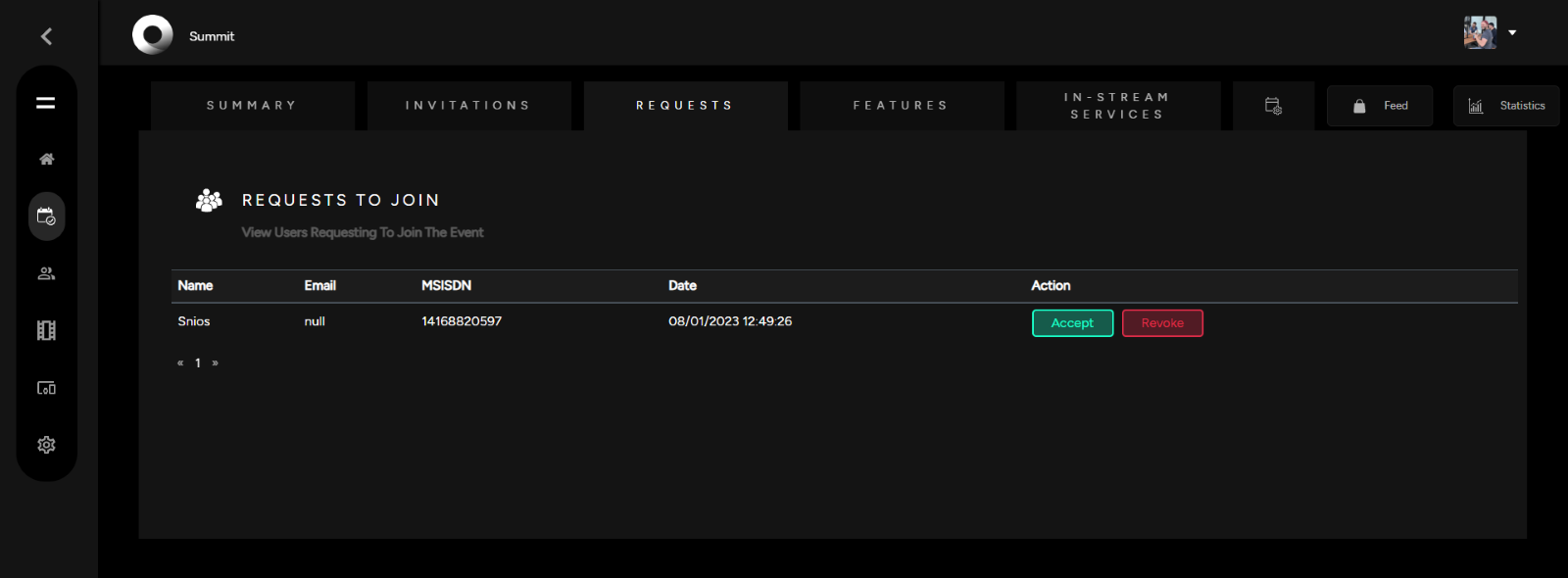
<span class="TextRun SCXW191933726 BCX0" data-contrast="auto" lang="EN-US" xml:lang="EN-US"><span class="NormalTextRun SCXW191933726 BCX0">You will have the option to view requests and decide whether to Accept or Revoke requests to join. </span></span>
<span class="SCXW191933726 BCX0"><span class="WACImageContainer NoPadding DragDrop BlobObject SCXW191933726 BCX0" role="presentation">![](http://support.odience.com/uploads/images/gallery/2023-12/embedded-image-2gdtwd41.png)</span></span>

<span class="EOP SCXW191933726 BCX0" data-ccp-props="{"201341983":0,"335551550":1,"335551620":1,"335559685":0,"335559739":160,"335559740":259}"><span class="TextRun SCXW191933726 BCX0" data-contrast="auto" lang="EN-US" xml:lang="EN-US"><span class="NormalTextRun SCXW191933726 BCX0">**Note**: Managing Requests will only be available if Registration was enabled in the Event Access Settings. See our guide to learn more about [**Registration &amp; Event Access options.**](https://support.odience.com/books/event-creation-management/page/create-event "Event Access")</span></span></span>