# Create Event

##### **Details**

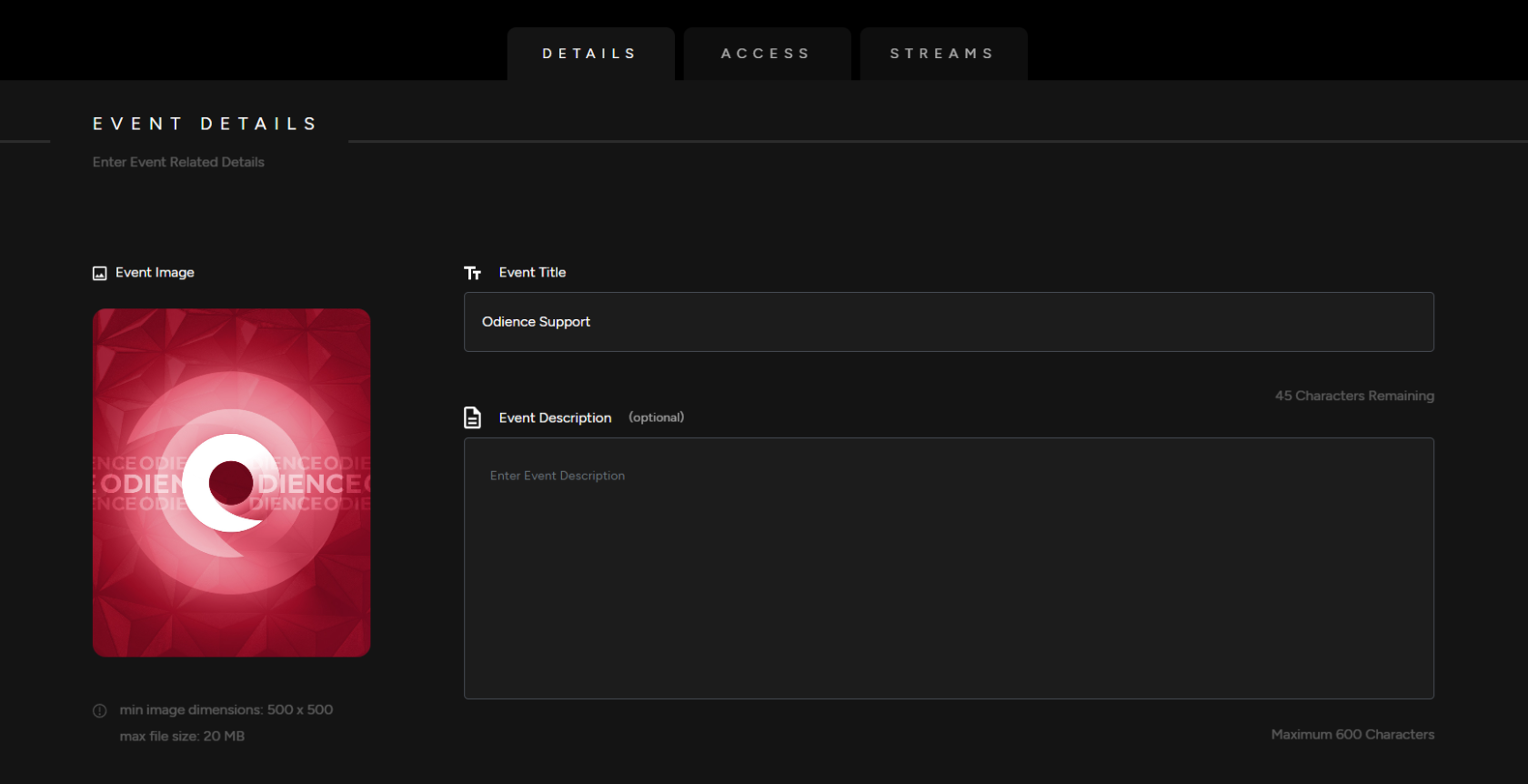
<span class="TextRun SCXW111589681 BCX0" data-contrast="none" lang="EN-CA" xml:lang="EN-CA"><span class="NormalTextRun SCXW111589681 BCX0">1.</span></span><span class="TextRun SCXW111589681 BCX0" data-contrast="none" lang="EN-CA" xml:lang="EN-CA"><span class="NormalTextRun SCXW111589681 BCX0"> Enter your your Event Details, Add a Title, Event Image &amp; Description (description is optional). </span></span>

[![Event Details.png](https://support.odience.com/uploads/images/gallery/2024-03/scaled-1680-/event-details.png)](https://support.odience.com/uploads/images/gallery/2024-03/event-details.png)

##### <span class="TextRun SCXW111589681 BCX0" data-contrast="none" lang="EN-CA" xml:lang="EN-CA"><span class="NormalTextRun SCXW111589681 BCX0">**Event Type**</span></span>**<span class="EOP SCXW111589681 BCX0" data-ccp-props="{"134233117":false,"134233118":false,"201341983":0,"335551550":1,"335551620":1,"335559685":0,"335559737":0,"335559738":0,"335559739":160,"335559740":259}"> </span>**

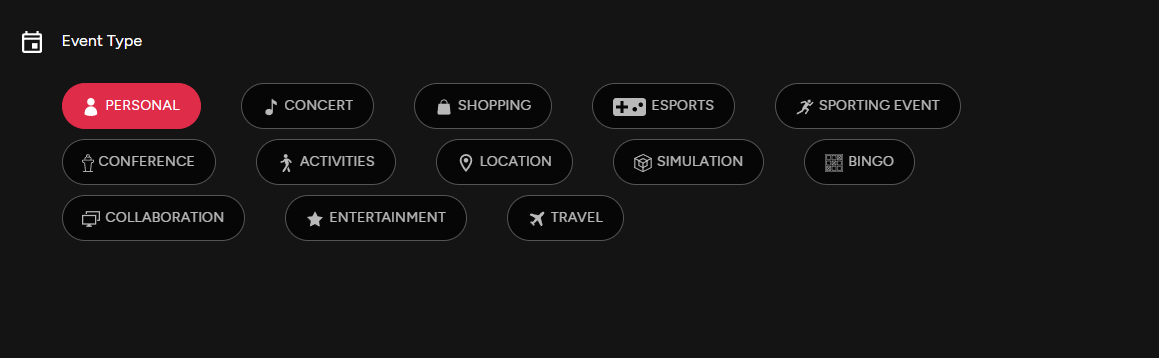
<span class="TextRun SCXW111589681 BCX0" data-contrast="none" lang="EN-CA" xml:lang="EN-CA"><span class="NormalTextRun SCXW111589681 BCX0">2. Select from the variety of Event Types offered.</span></span>

[![Event Type.png](http://support.odience.com/uploads/images/gallery/2023-12/scaled-1680-/event-type.png)](http://support.odience.com/uploads/images/gallery/2023-12/event-type.png)<span class="EOP SCXW111589681 BCX0" data-ccp-props="{"201341983":0,"335551550":1,"335551620":1,"335559685":0,"335559737":0,"335559739":160,"335559740":259}"> </span>

##### **<span class="TextRun SCXW111589681 BCX0" data-contrast="none" lang="EN-US" xml:lang="EN-US"><span class="NormalTextRun SCXW111589681 BCX0">Listing Add Ons</span></span>**

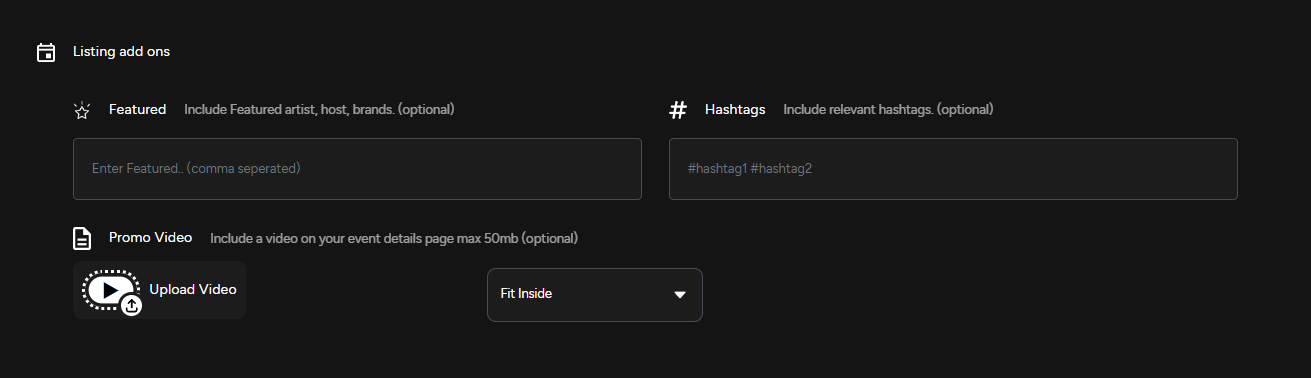
<span class="TextRun SCXW111589681 BCX0" data-contrast="none" lang="EN-US" xml:lang="EN-US"><span class="NormalTextRun SCXW111589681 BCX0">3. Include featured artists, host and brands. Use relevant hashtags &amp; upload a promo video to engage your audience. </span></span>

<span class="TextRun SCXW111589681 BCX0" data-contrast="none" lang="EN-US" xml:lang="EN-US"><span class="NormalTextRun SCXW111589681 BCX0">**Note**:</span></span> <span class="TextRun SCXW111589681 BCX0" data-contrast="none" lang="EN-US" xml:lang="EN-US"><span class="NormalTextRun SCXW111589681 BCX0">All Listing Add Ons are optional.</span></span>

**<span class="TextRun SCXW111589681 BCX0" data-contrast="none" lang="EN-US" xml:lang="EN-US"><span class="NormalTextRun SCXW111589681 BCX0">[![Listing Add Ons.png](https://support.odience.com/uploads/images/gallery/2024-03/scaled-1680-/listing-add-ons.png)](https://support.odience.com/uploads/images/gallery/2024-03/listing-add-ons.png)</span></span>**

<span class="TextRun SCXW111589681 BCX0" data-contrast="none" lang="EN-US" xml:lang="EN-US"><span class="NormalTextRun SCXW111589681 BCX0">3. </span></span><span class="TextRun SCXW111589681 BCX0" data-contrast="none" lang="EN-US" xml:lang="EN-US"><span class="NormalTextRun SCXW111589681 BCX0">Include featured artists, host and brands. Use</span></span><span class="TextRun SCXW111589681 BCX0" data-contrast="none" lang="EN-US" xml:lang="EN-US"><span class="NormalTextRun SCXW111589681 BCX0"> relevant hashtags &amp; upload a promo video to engage your audience. </span></span>

##### **<span class="TextRun SCXW111589681 BCX0" data-contrast="none" lang="EN-CA" xml:lang="EN-CA"><span class="NormalTextRun SCXW111589681 BCX0">Access</span></span>**

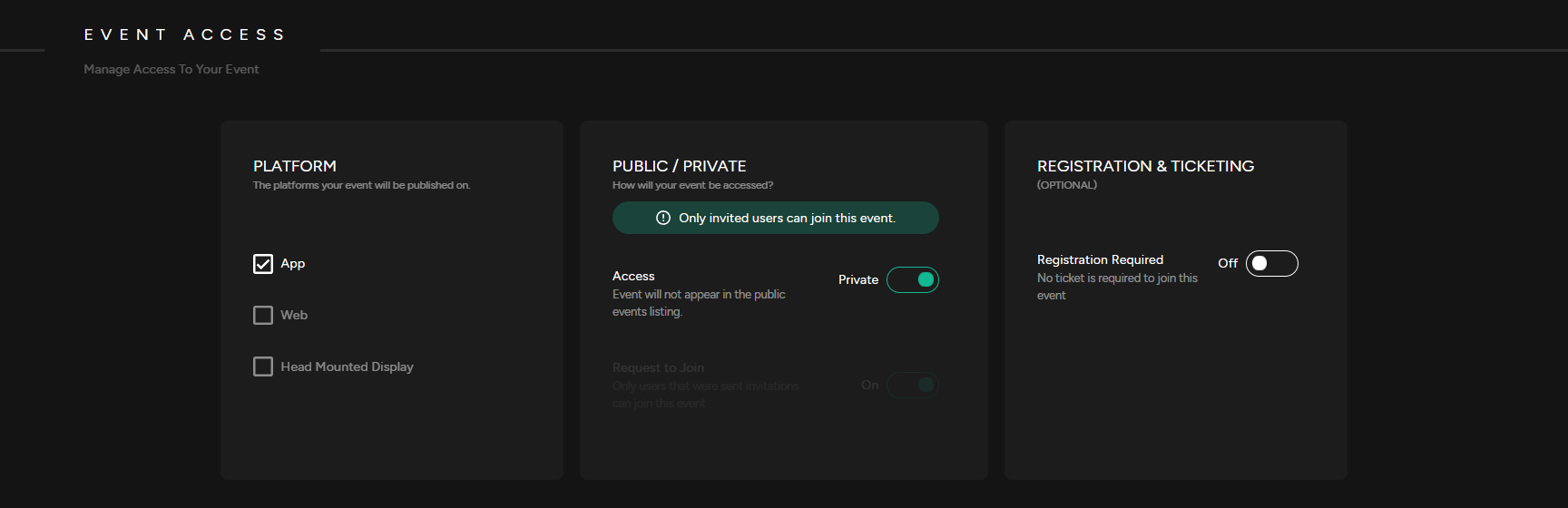
<span class="TextRun SCXW111589681 BCX0" data-contrast="none" lang="EN-CA" xml:lang="EN-CA"><span class="NormalTextRun SCXW111589681 BCX0">4. </span></span><span class="TextRun SCXW111589681 BCX0" data-contrast="none" lang="EN-CA" xml:lang="EN-CA"><span class="NormalTextRun SCXW111589681 BCX0">Select which Platform your event will be published on. Publishing options include our<span class="TextRun SCXW213872495 BCX0" data-contrast="none" lang="EN-CA" xml:lang="EN-CA"><span class="NormalTextRun SCXW213872495 BCX0"> mobile app, the web client</span><span class="NormalTextRun SCXW213872495 BCX0">, or </span><span class="NormalTextRun SCXW213872495 BCX0">using a</span><span class="NormalTextRun SCXW213872495 BCX0"> VR head mounted display. Odience supports all VR headsets, including Vision Pro</span></span></span></span>

[![Event Access.png](https://support.odience.com/uploads/images/gallery/2024-03/scaled-1680-/event-access.png)](https://support.odience.com/uploads/images/gallery/2024-03/event-access.png)

<span class="TextRun SCXW213872495 BCX0" data-contrast="none" lang="EN-US" xml:lang="EN-US"><span class="NormalTextRun SCXW213872495 BCX0">5. Public / Private</span></span><span class="EOP SCXW213872495 BCX0" data-ccp-props="{"134233117":false,"134233118":false,"201341983":0,"335551550":1,"335551620":1,"335559685":0,"335559737":0,"335559738":0,"335559739":160,"335559740":259}"> </span>

- <span class="EOP SCXW213872495 BCX0" data-ccp-props="{"134233117":false,"134233118":false,"201341983":0,"335551550":1,"335551620":1,"335559685":0,"335559737":0,"335559738":0,"335559739":160,"335559740":259}">Private Event: A Private</span><span class="TextRun SCXW213872495 BCX0" data-contrast="none" lang="EN-US" xml:lang="EN-US"><span class="NormalTextRun SCXW213872495 BCX0"> Event does not appear in the public events listing. Users will need to be invited to access the event. </span></span>
- <span class="NormalTextRun SCXW213872495 BCX0">Public Event: A Public Event is listed in the public directory and visible to everyone</span><span class="EOP SCXW213872495 BCX0" data-ccp-props="{"134233117":false,"134233118":false,"201341983":0,"335551550":1,"335551620":1,"335559737":0,"335559738":0,"335559739":160,"335559740":259}">.</span>
- <span class="EOP SCXW213872495 BCX0" data-ccp-props="{"134233117":false,"134233118":false,"201341983":0,"335551550":1,"335551620":1,"335559737":0,"335559738":0,"335559739":160,"335559740":259}">Request to Join: If enabled, users will need to request to join the event. </span>

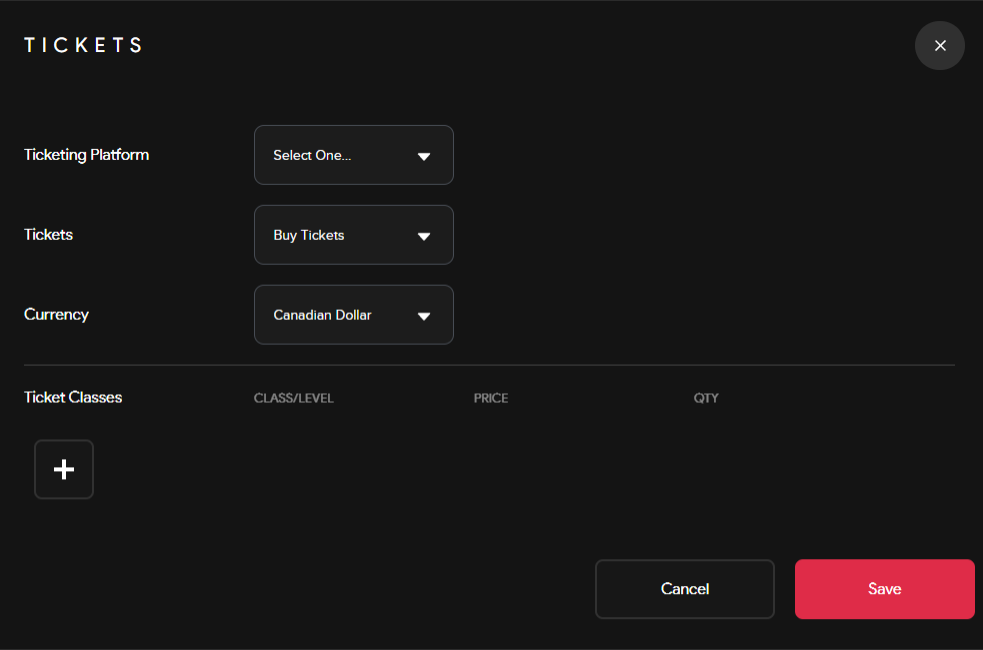
<span class="TextRun SCXW213872495 BCX0" data-contrast="none" lang="EN-US" xml:lang="EN-US"><span class="NormalTextRun SCXW213872495 BCX0">6. Registration &amp; Ticketing (*optional*): Enable registration before joining your event. Set-up a ticketing system that allows you to administer free or paid tickets. Select a platform to distribute your tickets, pick a currency &amp; include ticket classes to sell different types of tickets.</span></span>

<span class="TextRun SCXW213872495 BCX0" data-contrast="none" lang="EN-US" xml:lang="EN-US"><span class="NormalTextRun SCXW213872495 BCX0"><span class="SCXW213872495 BCX0"><span class="WACImageContainer NoPadding DragDrop BlobObject SCXW213872495 BCX0" role="presentation">![](http://support.odience.com/uploads/images/gallery/2023-12/embedded-image-pc4chvyw.png)</span></span></span></span>

<span class="TextRun SCXW213872495 BCX0" data-contrast="none" lang="EN-CA" xml:lang="EN-CA"><span class="NormalTextRun SCXW213872495 BCX0"><span class="TextRun SCXW213872495 BCX0" data-contrast="none" lang="EN-CA" style="outline-color: var(--color-primary); font-style: normal; font-variant-ligatures: normal; font-variant-caps: normal; font-size: 14px; font-family: -apple-system, BlinkMacSystemFont, 'Segoe UI', Oxygen, Ubuntu, Roboto, Cantarell, 'Fira Sans', 'Droid Sans', 'Helvetica Neue', sans-serif;" xml:lang="EN-CA"><span class="NormalTextRun SCXW213872495 BCX0" style="outline-color: var(--color-primary);">7. </span></span></span></span><span class="TextRun SCXW213872495 BCX0" data-contrast="none" lang="EN-CA" style="outline-color: var(--color-primary);" xml:lang="EN-CA"><span class="NormalTextRun SCXW213872495 BCX0" style="outline-color: var(--color-primary);">Select the Start/End date of your event, set a capacity &amp; add an event location. </span></span>

##### **<span class="EOP SCXW213872495 BCX0" data-ccp-props="{"201341983":0,"335551550":1,"335551620":1,"335559737":0,"335559739":160,"335559740":259}"><span class="SCXW213872495 BCX0"><span class="WACImageContainer NoPadding DragDrop BlobObject SCXW213872495 BCX0" role="presentation">Streams</span></span></span>**

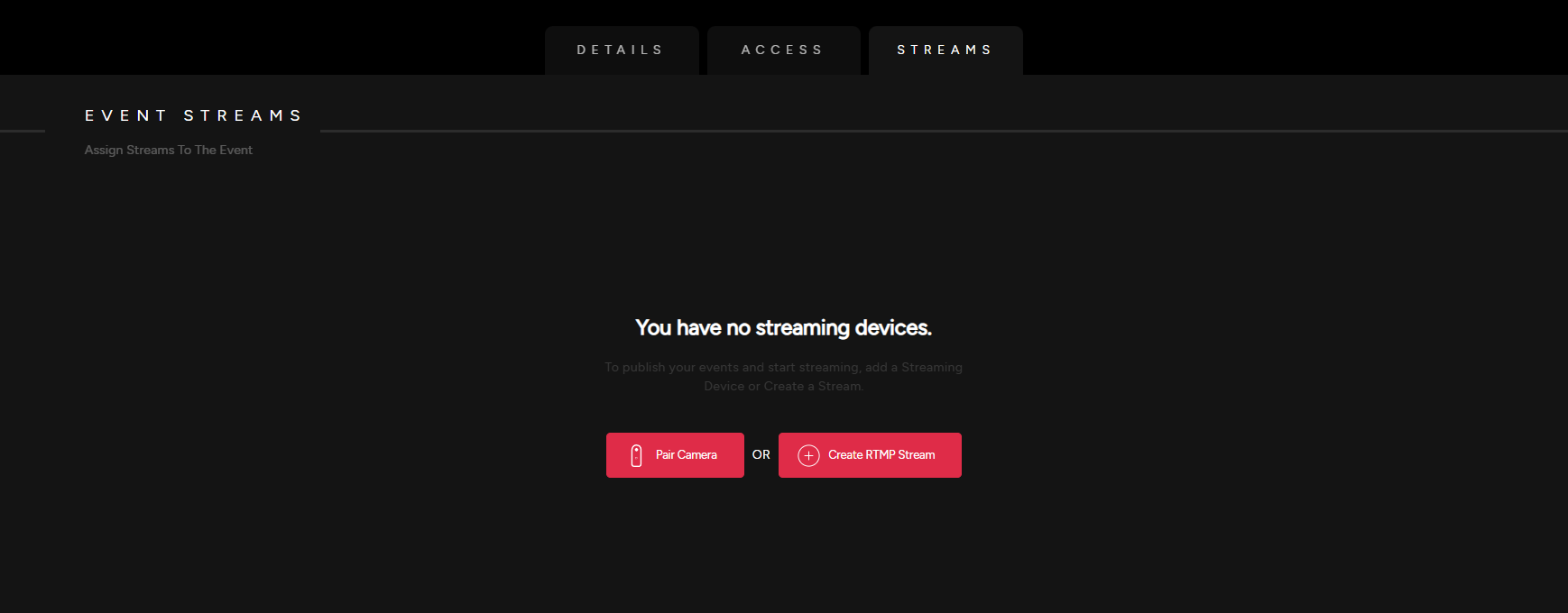
<span class="TextRun SCXW247573221 BCX0" data-contrast="auto" lang="EN-US" xml:lang="EN-US"><span class="NormalTextRun SCXW247573221 BCX0">8. Pair a 360 Camera by scanning QR code in the pop up screen or create and then assign an RTMP stream to your event.</span></span>

- See our detailed guide on how to [**Pair a 360 Camera** ](https://support.odience.com/books/director-web-portal/page/pair-360-camera "Pair 360 Camera")or how to [**Create an RTMP Stream**](https://support.odience.com/books/director-web-portal/page/create-rtmp-stream "Create RTMP Stream").

[![Streams.png](https://support.odience.com/uploads/images/gallery/2024-03/scaled-1680-/streams.png)](https://support.odience.com/uploads/images/gallery/2024-03/streams.png)

Already assigned a stream to your event? [**Invite an audience**](https://support.odience.com/books/web-portal/page/invitations-guest-lists "Invitations & Guest Lists") to join your event.